

The Hidden Cost of Fulfillment Failures
You’ve optimized your checkout, tweaked your payment gateways, and even A/B tested your product pages. Yet, revenue still slips through the cracks from failed fulfillment.
Every day, WooCommerce stores lose money in two ways. First, there are the visible failures: angry customers flooding your inbox, disputed charges, and negative reviews. These are frustrating, but at least you know about them.
Then there are the silent failures with the hidden costs. These are the orders where customers pay but never receive their products, subscriptions that renew without delivering, or digital downloads that remain locked despite successful payment. Worse? The customer never complains. They lose track and move on, taking their future purchases with them.
This article exposes these hidden revenue drains and introduces a scalable, automated solution to eliminate them using Order Daemon’s precision-driven approach.
Visible Failures: The Support Ticket Nightmare
The most obvious revenue losses come from frustrated customers who reach out when something goes wrong. These visible failures create immediate problems: support overhead, refund requests, and damaged brand reputation.
One of the most common complaints for digital product stores is “I paid but didn’t get my download.” The root cause typically traces back to webhook failures like Stripe timeouts and PayPal IPN delays, or server errors that prevent the payment gateway from communicating with WooCommerce. The impact extends beyond a single lost sale. Customers demand refunds, support teams scramble to manually process orders, and trust erodes with each incident.
Another frequent frustration is “My order is stuck on ‘Pending’ for hours.” These cases usually stem from gateway synchronization issues where PayPal or other processors successfully capture payment but fail to signal WooCommerce to update the order status. The result? Delayed shipping, angry emails, and customers wondering if they’ve been scammed.
Traditional troubleshooting for these issues involves multiple manual steps. Administrators can check gateway related order issues by using commands like this that at least identify what orders might be affected:
wp db query "SELECT p.ID FROM wp_posts p
             JOIN wp_postmeta pm ON p.ID = pm.post_id
             WHERE p.post_status = 'wc-pending'
             AND pm.meta_key = '_payment_method'
             AND pm.meta_value IN ('stripe', 'paypal')"
They test webhook resends using tools like Stripe CLI or PayPal’s IPN Simulator to force retries. Some resort to writing custom scripts to resync orders or setting up cron jobs to periodically check for stuck orders.
These manual approaches can work, but they don’t scale. They are reactive and fragile; each incident requiring human intervention, and the time cost multiplies as order volume grows. For a store processing hundreds of orders daily, this becomes a full-time job.
Silent Failures: The Invisible Revenue Drain
While visible failures generate support tickets, silent failures are far more insidious. These represent customers who pay but never receive their products… and never complain. Maybe they assume the download link will arrive later. Perhaps they forget about the purchase entirely. Some might think it’s a technical glitch on their end. Regardless of the reason, these customers represent pure future revenue loss with no feedback mechanism to alert the store owner.
Subscription renewals that fail silently create particularly painful losses. The payment processes successfully, money leaves the customer’s account, but the subscription service never activates. Digital downloads that never unlock despite successful payment create the same problem. Customers might eventually notice and complain, but often they simply write off the purchase and never return.
Silent failures occur due to asynchronous processing gaps in the fulfillment chain. Cron jobs fail to execute on schedule. IPN notifications time out before reaching the server. Webhooks drop due to temporary server issues or misconfigurations. Each gap creates an opportunity for an order to fall through the cracks.
The fundamental problem is the absence of automated monitoring. Most stores only investigate orders when customers complain. Without proactive auditing, paid-but-unfulfilled orders can sit undetected for days, weeks, or indefinitely.
Monitoring asynchronous processing gaps involves tracking cron job execution and logging IPN and webhook responses from payment processors. The challenge is consistency. Manual audits only happen when someone remembers to run them, and by then, the damage is done.
Order Daemon’s Automation Framework: The Solution
The traditional approach of custom scripts and manual checks might work at small scale, but it crumbles as order volume grows and custom solutions need maintaining, especially for multiple websites. Every manual intervention represents time that could be spent on strategic initiatives rather than operational firefighting.
Order Daemon’s precision-driven framework replaces these fragile manual fixes with reliable, rule-based automation. By treating fulfillment failures as systematic problems requiring systematic solutions, it eliminates both the obvious revenue drains and the silent ones that most store owners never even detect.
Instead of spending hours each week manually debugging orders, Order Daemon automates the process; providing visibility into issues in real time and the automation engine to fundamentally reducing the need for constant human oversight. Where manual methods might catch some failures after the fact, Order Daemon’s proactive monitoring ensures that silent failures are identified and resolved before they impact revenue.
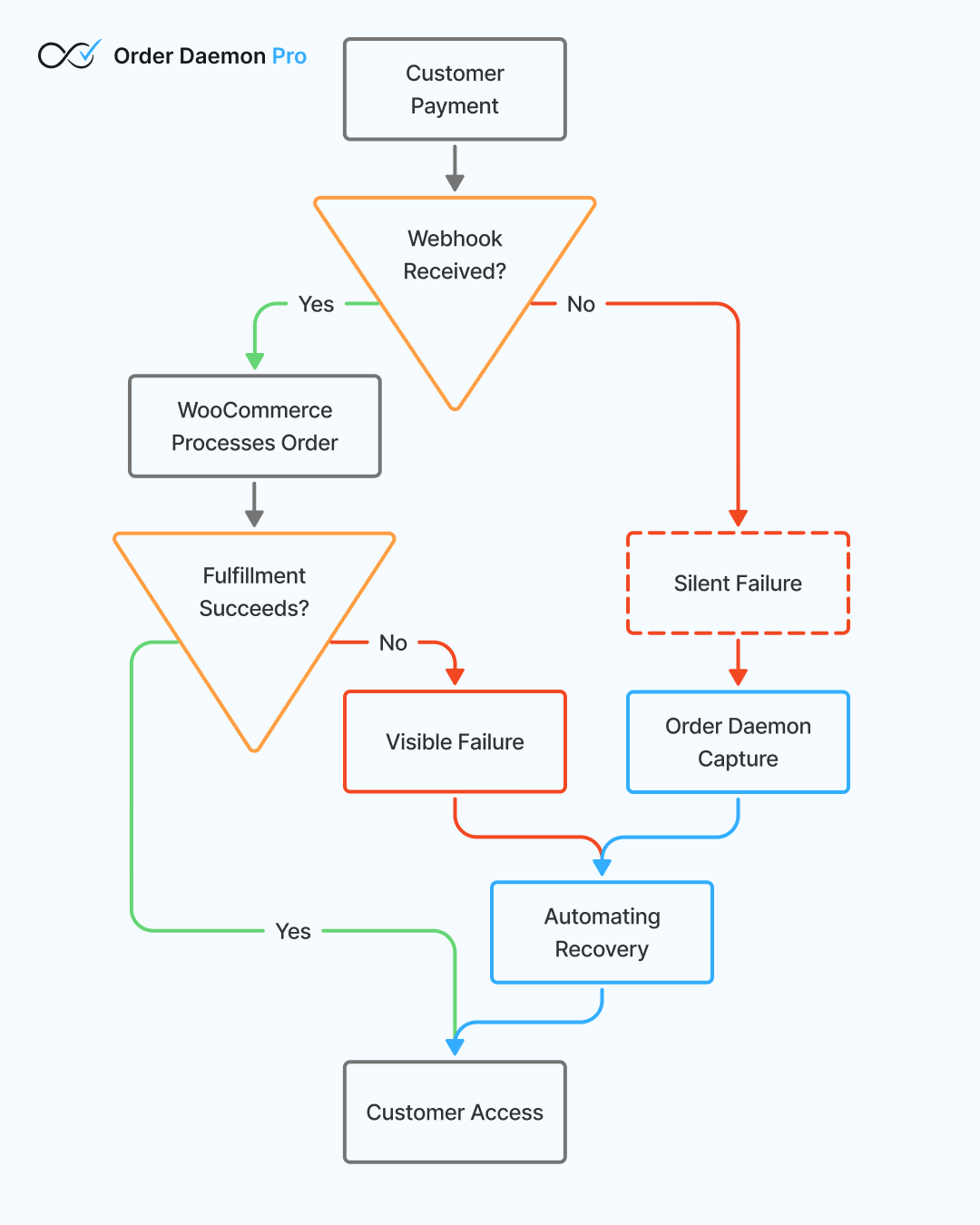
The system’s rule-based triggers and actions create reliable, repeatable responses to common failure scenarios. For example:
- A
PaymentCompleteTriggercan automatically execute aChangeStatusToProcessingAction, ensuring orders never get stuck in pending status. - An
OrderProcessingTrigger, for anOrderTotalConditionof over $50, can execute aSendEmailActionto your customer success team.
For developers and agencies who need precise control, Order Daemon Pro includes CLI tools like:
# Find log entries for order #12345 with json (or yaml/csv)
wp odcm log export --order-id=12345 --format=yaml
# View the detailed event data for a speicfic audit log entry
wp odcm log view --id=163 --format=json --pretty# Test run a specific order id against a rule to check if it matches
wp odcm debug rule --rule=5 --order=12345 --dry-runThese CLI commands allow administrators to quickly simulate fulfillment logic before applying fixes, preventing well-intentioned changes from creating new problems.
Learn more about the Order Daemon Pro CLI in the docs.
Conclusion: Automation Beats Manual Fixes
Fulfillment failures, whether visible or silent, cost time, money, and customer trust. The traditional approach of custom scripts and manual checks might work at small scale, but it crumbles as order volume grows.
Order Daemon’s “Surgeon’s Scalpel” philosophy emphasizes precision over brute force, targeting specific problems with surgical accuracy rather than applying broad, resource-intensive solutions. Built for developers and agencies who demand professional-grade tools, it provides the rule engines, monitoring capabilities, and CLI commands needed to maintain bulletproof fulfillment at scale.
The question isn’t whether your store has fulfillment failures, but how much revenue you’re losing to them without knowing it.